
Interaction
Mit dem Interaction-Modul erweckst du deine Datenbank-Elemente zum Leben und gestaltest interaktive Oberflächen, die deine Nutzer begeistern werden. Es ist Teil unseres Essential UI Bundles, das vier Module für eine optimale Darstellung deiner Inhalte bietet: Layout, Interaction, Badge und Card. Während sich die Module unseres Bundles den gleichen optimierten JS-Code teilen und dadurch eine hohe Performance und Flexibilität bieten, ermöglichen sie dir durch ihr unterschiedliches Grunddesign eine schnellere Umsetzung passender Darstellungen.
Funktion und Aussehen
Das Interaction-Modul ist von Grund auf als interaktiver Button konzipiert. Das bedeutet, du musst dich nicht um das Styling und die grundlegende Optik kümmern – unser Modul bringt bereits die notwendigen Eigenschaften mit, um wie ein anklickbares Element auszusehen. Du kannst es nutzen, um Aktionen auszulösen, Informationen ein- oder auszublenden oder einfach nur als klaren Navigationspunkt. Wie bei allen Modulen des Essential UI Bundles kannst du das Aussehen über den Style-Key oder den Class-Key an dein individuelles Design anpassen. Nutze den Class-Key, um deine eigenen globalen Classes zu referenzieren.
Nutzer-Interaktion
Die Stärke des Interaction-Moduls liegt in seinen vielseitigen Interaktionsmöglichkeiten. Du kannst jedem interaktiven Element eine beliebige Anzahl an Actions zuweisen. Jede Action besteht aus einem auslösenden Trigger und einem Array von Scripts, die bei Auslösen des Triggers ausgeführt werden. Als Trigger können Klick, Mausbewegung und alle weiteren HTML Mouse Events eingesetzt werden. Je nach Anwendung können auch andere HTML Events funktionieren. Eine Liste solcher Events findest du beispielsweise hier. Weitere Infos zu Actions findest du in diesem Teil unserer Doku.
Modulcode
GIP_interaction({
   uniqueId: "myUniqueName" + Nr,
   embedded: true,
   direction: "horizontal",
   blocks: [{
   	value: *any*,
   }],
})GIP_interaction({
uniqueId: "myUniqueName" + Nr,
embedded: true,
direction: "horizontal",
style: "",
hoverElement: {
style: "",
value: *any*,
},
blocks: [{
style: "",
hoverElement: {
style: "",
value: *any*,
},
value: *any*,
}],
})GIP_interaction({
uniqueId: "myUniqueName" + Nr,
embedded: true,
direction: "horizontal",
class: "",
style: "",
hoverElement: {
class: "",
style: "",
value: *any*,
actions: [{
trigger: "click",
scripts: [{
type: "",
}],
}],
},
blocks: [{
class: "",
style: "",
hoverElement: {
class: "",
style: "",
value: *any*,
actions: [{
trigger: "click",
scripts: [{
type: "",
}],
}],
},
value: *any*,
actions: [{
trigger: "click",
scripts: [{
type: "",
}],
}],
}],
actions: [{
trigger: "click",
scripts: [{
type: "",
}],
}],
})GIP_interaction({
uniqueId: "",
embedded: {
height: "",
styleHtml: "",
styleStri: "",
styleFn: "",
styleLabel: "",
styleComp: "",
presets: "",
},
direction: "",
class: "",
style: "",
hoverElement: {
class: "",
style: "",
value: *any*,
actions: [{
trigger: "",
scripts: [{
type: "",
}],
}],
},
blocks: [{
class: "",
style: "",
hoverElement: {
class: "",
style: "",
value: *any*,
actions: [{
trigger: "",
scripts: [{
type: "",
}],
}],
},
value: *any*,
actions: [{
trigger: "",
scripts: [{
type: "",
}],
}],
}],
actions: [{
trigger: "",
scripts: [{
type: "",
}],
}],
})html( raw(GIP_master({})) +
raw(GIP_interaction({
uniqueId: "",
embedded: {
height: "",
styleHtml: "",
styleStri: "",
styleFn: "",
styleLabel: "",
styleComp: "",
presets: "",
},
direction: "",
class: "",
style: "",
hoverElement: {
class: "",
style: "",
value: *any*,
actions: [{
trigger: "",
scripts: [{
type: "",
}],
}],
},
blocks: [{
class: "",
style: "",
hoverElement: {
class: "",
style: "",
value: *any*,
actions: [{
trigger: "",
scripts: [{
type: "",
}],
}],
},
value: *any*,
actions: [{
trigger: "",
scripts: [{
type: "",
}],
}],
}],
actions: [{
trigger: "",
scripts: [{
type: "",
}],
}],
})
))Key-Table
|
|
|
|
|
|
|
|
|
|
|
|
|
|
|
|
|
|
|
|
|
|
|
|
|
|
|
|
|
|
|
|
|
|
|
|
|
|
|
|
Beispiele
Interaction: Button mit Update-Action
Beschreibung
Wir möchten einen Button erstellen, der ein Ninox-Textfeld mit einem Text updated. Dafür müssen wir lediglich die ID des Ziel-Records, die ID des Ziel-Feldes und den Value angeben, der geschrieben werden soll.
Code des Beispiels
html(raw(GIP_master({})) +
raw(GIP_interaction({
		uniqueId: "Generate Text" + Nr,
		embedded: false,
		direction: "",
		class: "",
		style: "",
		blocks: [{
				class: "",
				style: "width: 100%;",
				value: "Text generieren",
				actions: [{
						trigger: "click",
						scripts: [{
								type: "update",
								recordId: raw(Nr),
								fieldId: fieldId(this, "Text"),
								value: "Hallo Welt"
							}]
					}]
			}]
})))GIP_interaction({
uniqueId: "Generate Text" + Nr,
embedded: true,
direction: "",
class: "",
style: "",
blocks: [{
class: "",
style: "width: 100%;",
value: "Text generieren",
actions: [{
trigger: "click",
scripts: [{
type: "update",
recordId: raw(Nr),
fieldId: fieldId(this, "Text"),
value: "Hallo Welt"
}]
}]
}]
})Interaction: Button mit Create-Action
Beschreibung
Wir möchten einen Button erstellen, der einen neuen Record in unserer Tabelle erzeugt. Unseren aktuellen Record möchten wir mit diesem neu erstellten Record verknüpfen. Außerdem wollen wir im neuen Record einen Text in ein Textfeld schreiben. Nach dem erstellen soll der Record als Ninox-Popup geöffnet werden.
Code des Beispiels
html(raw(GIP_master({})) +
raw(GIP_interaction({
		uniqueId: "Create Record" + Nr,
		embedded: false,
		direction: "",
		class: "GIPColorRed",
		style: "",
		blocks: [{
				style: "width: 100%;",
				value: "Neuen Record erstellen und verknüpfen"
			}],
		actions: [{
				trigger: "click",
				scripts: [{
						type: "create",
						tableId: "V",
						tab: "",
						changeFieldValues: [{
								fieldId: fieldId(this, "Text"),
								value: "Hallo neuer Record"
							}],
						displayAfterCreate: "popup",
						setNewRecordId: [{
								fieldId: fieldId(this, "Actions und Functions: Verknüpfter Record"),
								recordId: Nr
							}]
					}]
			}]
})))GIP_interaction({
uniqueId: "Create Record" + Nr,
embedded: true,
direction: "",
class: "GIPColorRed",
style: "",
blocks: [{
style: "width: 100%;",
value: "Neuen Record erstellen und verknüpfen"
}],
actions: [{
trigger: "click",
scripts: [{
type: "create",
tableId: "V",
tab: "",
changeFieldValues: [{
fieldId: fieldId(this, "Text"),
value: "Hallo neuer Record"
}],
displayAfterCreate: "popup",
setNewRecordId: [{
fieldId: fieldId(this, "Actions und Functions: Verknüpfter Record"),
recordId: Nr
}]
}]
}]
})Interaction: Global CSS-Classes
Beschreibung
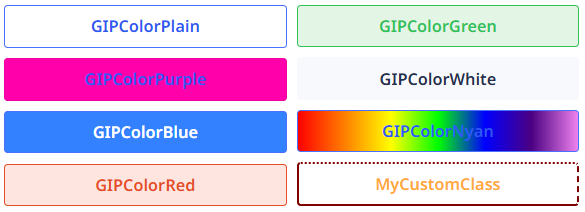
Wir möchten ein GIP-Interaction stylen und dafür eine globale CSS-Class nutzen. Dafür können wir entweder eine Auswahl an GIP-Color-Classes nutzen (teilweise basierend auf Ninox-eigenen Button-Stylings) oder wir legen eine eigene CSS-Class an.
Infos zu den existierenden GIP-Color-Classes und dazu, wie du eigene CSS-Classes anlegst, findest du im Kapitel "Globaler CSS-Code".
Code des Beispiels
---
############### Füge den folgenden CSS-Code in die globale Funktion "GIP_customCSS()" ein und lade Ninox neu: ###############
---;
"
	.MyCustomClass {
		color: #FFAA3A;
		border-width: 2px;
		border-color: #7F0000;
		border-style: dotted dashed solid double;
	}
";
---
############### Füge den folgenden Code in dein Ninox-Formelfeld ein: ###############
---;
html(raw(GIP_master({}))  +
raw(GIP_layout({
		uniqueId: "Horizontal" + Nr,
		embedded: false,
		direction: "horizontal",
		style: "gap: 8px;",
		blocks: [{
				value: GIP_layout({
						uniqueId: "Vertical1" + Nr,
						embedded: true,
						direction: "vertical",
						style: "gap: 8px;",
						blocks: [{
								value: GIP_interaction({
										uniqueId: "GIPColorPlain" + Nr,
										embedded: true,
										class: "GIPColorPlain",
										blocks: [{
												value: "GIPColorPlain"
											}]
									})
							}, {
								value: GIP_interaction({
										uniqueId: "GIPColorPurple" + Nr,
										embedded: true,
										class: "GIPColorPurple",
										blocks: [{
												value: "GIPColorPurple"
											}]
									})
							}, {
								value: GIP_interaction({
										uniqueId: "GIPColorBlue" + Nr,
										embedded: true,
										class: "GIPColorBlue",
										blocks: [{
												value: "GIPColorBlue"
											}]
									})
							}, {
								value: GIP_interaction({
										uniqueId: "GIPColorRed" + Nr,
										embedded: true,
										class: "GIPColorRed",
										blocks: [{
												value: "GIPColorRed"
											}]
									})
							}]
					})
			}, {
				value: GIP_layout({
						uniqueId: "Vertical2" + Nr,
						embedded: true,
						direction: "vertical",
						style: "gap: 8px;",
						blocks: [{
								value: GIP_interaction({
										uniqueId: "GIPColorGreen" + Nr,
										embedded: true,
										class: "GIPColorGreen",
										blocks: [{
												value: "GIPColorGreen"
											}]
									})
							}, {
								value: GIP_interaction({
										uniqueId: "GIPColorWhite" + Nr,
										embedded: true,
										class: "GIPColorWhite",
										blocks: [{
												value: "GIPColorWhite"
											}]
									})
							}, {
								value: GIP_interaction({
										uniqueId: "GIPColorNyan" + Nr,
										embedded: true,
										class: "GIPColorNyan",
										blocks: [{
												value: "GIPColorNyan"
											}]
									})
							}, {
								value: GIP_interaction({
										uniqueId: "MyCustomClass" + Nr,
										embedded: true,
										class: "MyCustomClass",
										blocks: [{
												value: "MyCustomClass"
											}]
									})
							}]
					})
			}]
})))---
############### Füge den folgenden CSS-Code in die globale Funktion "GIP_customCSS()" ein und lade Ninox neu: ###############
---;
"
.MyCustomClass {
color: #FFAA3A;
border-width: 2px;
border-color: #7F0000;
border-style: dotted dashed solid double;
}
";
---
############### Füge den folgenden Code in dein Ninox-Formelfeld ein: ###############
---;
GIP_layout({
uniqueId: "Horizontal" + Nr,
embedded: true,
direction: "horizontal",
style: "gap: 8px;",
blocks: [{
value: GIP_layout({
uniqueId: "Vertical1" + Nr,
embedded: true,
direction: "vertical",
style: "gap: 8px;",
blocks: [{
value: GIP_interaction({
uniqueId: "GIPColorPlain" + Nr,
embedded: true,
class: "GIPColorPlain",
blocks: [{
value: "GIPColorPlain"
}]
})
}, {
value: GIP_interaction({
uniqueId: "GIPColorPurple" + Nr,
embedded: true,
class: "GIPColorPurple",
blocks: [{
value: "GIPColorPurple"
}]
})
}, {
value: GIP_interaction({
uniqueId: "GIPColorBlue" + Nr,
embedded: true,
class: "GIPColorBlue",
blocks: [{
value: "GIPColorBlue"
}]
})
}, {
value: GIP_interaction({
uniqueId: "GIPColorRed" + Nr,
embedded: true,
class: "GIPColorRed",
blocks: [{
value: "GIPColorRed"
}]
})
}]
})
}, {
value: GIP_layout({
uniqueId: "Vertical2" + Nr,
embedded: true,
direction: "vertical",
style: "gap: 8px;",
blocks: [{
value: GIP_interaction({
uniqueId: "GIPColorGreen" + Nr,
embedded: true,
class: "GIPColorGreen",
blocks: [{
value: "GIPColorGreen"
}]
})
}, {
value: GIP_interaction({
uniqueId: "GIPColorWhite" + Nr,
embedded: true,
class: "GIPColorWhite",
blocks: [{
value: "GIPColorWhite"
}]
})
}, {
value: GIP_interaction({
uniqueId: "GIPColorNyan" + Nr,
embedded: true,
class: "GIPColorNyan",
blocks: [{
value: "GIPColorNyan"
}]
})
}, {
value: GIP_interaction({
uniqueId: "MyCustomClass" + Nr,
embedded: true,
class: "MyCustomClass",
blocks: [{
value: "MyCustomClass"
}]
})
}]
})
}]
})Grid: Nachbau der Ninox-Ticks
Beschreibung
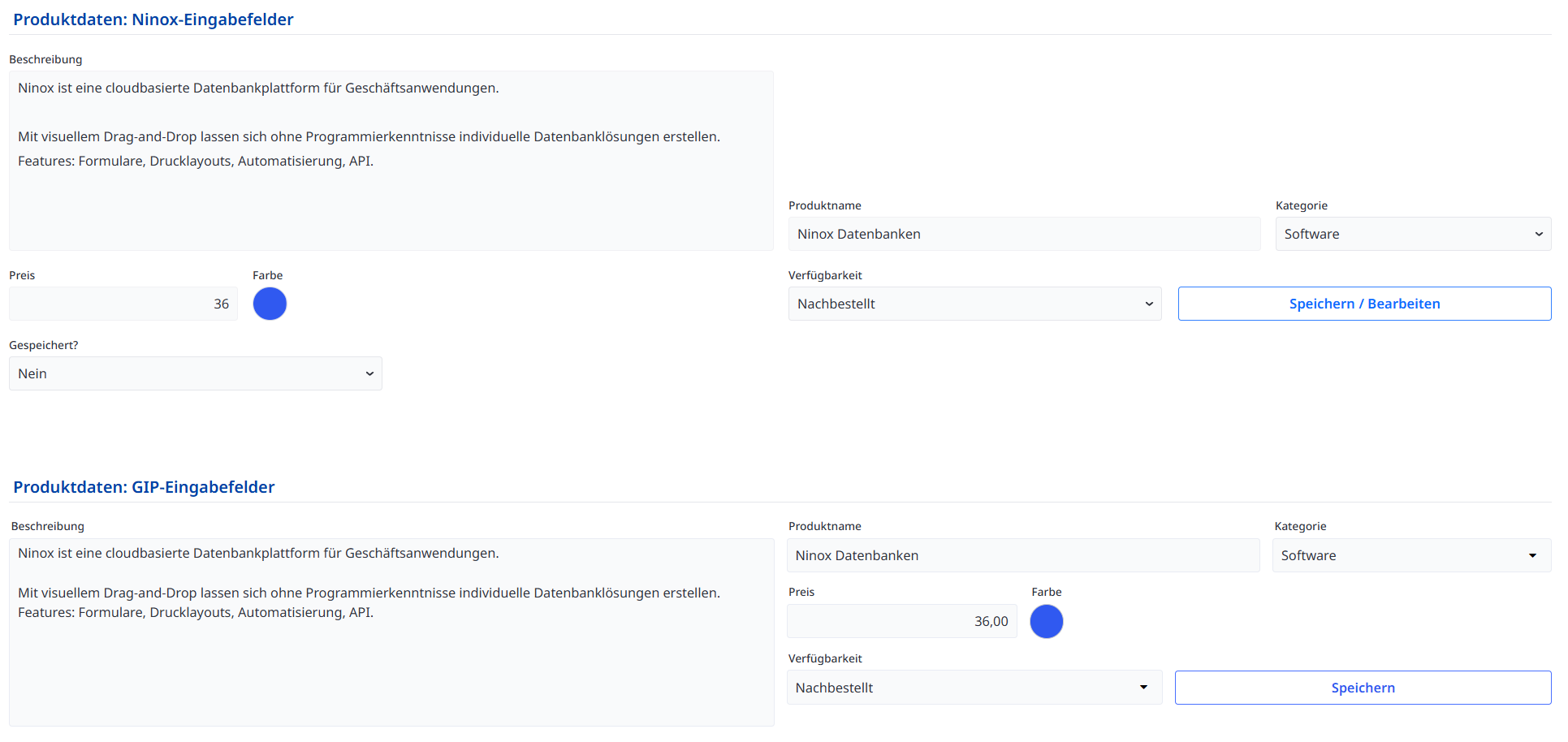
Wir möchten eine Eingabemaske für Produktdaten bauen, die sich optisch möglichst nah an normalen Ninox-Feldern orientiert. Gleichzeitig soll rechts neben einem mehrzeiligen Textfeld eine kompakte Feldgruppe über mehrere Zeilen angezeigt werden. Dieses Layout lässt sich mit Standard-Ninox-Feldern in Ninox 3 nicht direkt nachbauen.
Der zentrale Punkt ist die Konfiguration des GIP-Grids: Die Grid-Tracks werden so angelegt, dass sie den Ninox-Ticks entsprechen. Auf Smartphones verwendet Ninox 16 Ticks, auf größeren Oberflächen 32 Ticks. Deshalb wird die Anzahl der Grid-Tracks über ninoxApp() abhängig vom Gerät gesetzt:
let isMobile := contains(["android", "iphone"], ninoxApp());
let trackCount := if isMobile then 16 else 32 end;
GIP_grid({
	uniqueId: "Product Info" + Nr,
	embedded: false,
	gridTrackCount: trackCount,
	gridTrackSize: "minmax(1px, 1fr)",
	direction: "horizontal",
	style: "gap: 12px;",
	blocks: gridItems
})Nach dieser Konfiguration können die Breiten der einzelnen Felder über grid-column als Tick-Spanne angegeben werden. Das mehrzeilige Textfeld nimmt zusätzlich mehrere Grid-Zeilen ein:
let spanDesc := "grid-column: span 16; grid-row: span 4;";
let spanName := "grid-column: span 10;";
let spanCategory := "grid-column: span 6;";
let spanPrice := "grid-column: span 5;";
let spanColor := "grid-column: span 11;";
let spanStatus := "grid-column: span 8;";
let spanButton := "grid-column: span 8; align-content: end;";Die vorbereiteten Styles werden anschließend direkt an die Grid-Blocks übergeben:
let gridItems := [{
			style: spanDesc,
			value: GIP_input({
					uniqueId: "Description" + Nr,
					...
				})
		}, {
			style: spanName,
			value: GIP_input({
					uniqueId: "Name" + Nr,
					...
				})
		}, {
			style: spanCategory,
			value: GIP_select({
					uniqueId: "Category" + Nr,
					...
				})
		},
...];Auf Smartphones entsteht dadurch dasselbe Umbruchverhalten wie bei Standard-Ninox-Feldern: 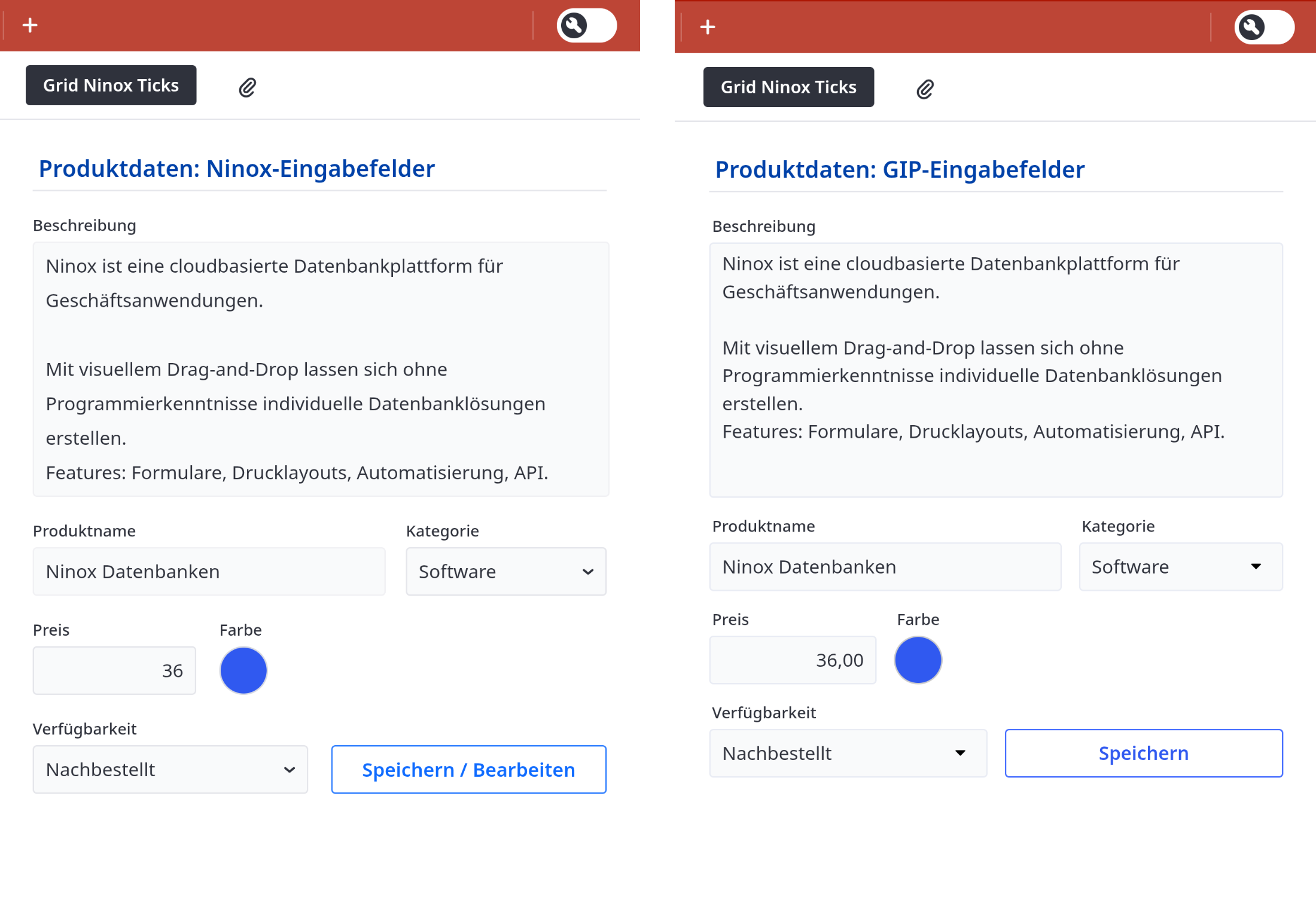
Code des Beispiels
---
Die folgenden globalen Funktionen müssen in Ninox unter Datenbankeinstellungen -> Globale Funktionen hinzugefügt werden:
---;
function productCategoryOptions() do
	[{
			id: 1,
			caption: "Elektronik"
		}, {
			id: 2,
			caption: "Büromaterial"
		}, {
			id: 3,
			caption: "Möbel"
		}, {
			id: 4,
			caption: "Software"
		}, {
			id: 5,
			caption: "Zubehör"
		}]
end;
function productStatusOptions() do
	[{
			id: 1,
			caption: "Auf Lager"
		}, {
			id: 2,
			caption: "Nachbestellt"
		}, {
			id: 3,
			caption: "Nicht verfügbar"
		}]
end;
---
Ab hier beginnt der eigentliche Grid-Code:
---;
let isMobile := contains(["android", "iphone"], ninoxApp());
let trackCount := if isMobile then 16 else 32 end;
let spanDesc := "grid-column: span 16; grid-row: span 4;";
let spanName := "grid-column: span 10;";
let spanCategory := "grid-column: span 6;";
let spanPrice := "grid-column: span 5;";
let spanColor := "grid-column: span 11;";
let spanStatus := "grid-column: span 8;";
let spanButton := "grid-column: span 8; align-content: end;";
let customIconSelected := GIP_materialSymbols({
			embedded: true,
			color: "#3381ff",
			icon: "radio_button_checked"
		});
let customIconUnselected := GIP_materialSymbols({
			embedded: true,
			color: "#3381ff",
			icon: "radio_button_unchecked"
		});
let gridItems := [{
			style: spanDesc,
			value: GIP_input({
					uniqueId: "Description" + Nr,
					embedded: true,
					inputType: "textarea",
					recordId: Nr,
					fieldId: "D",
					contentEditable: not 'Gespeichert?',
					style: "height: 168px; background-color: #f9fafb;",
					fieldContent: {
						style: "background-color: white;",
						value: Beschreibung
					},
					label: {
						style: "color: #2f323c;",
						value: "Beschreibung"
					}
				})
		}, {
			style: spanName,
			value: GIP_input({
					uniqueId: "Name" + Nr,
					embedded: true,
					inputType: "text",
					recordId: Nr,
					fieldId: "E",
					contentEditable: not 'Gespeichert?',
					style: "background-color: #f9fafb;",
					fieldContent: {
						style: "background-color: white;",
						value: Produktname
					},
					label: {
						style: "color: #2f323c;",
						value: "Produktname"
					}
				})
		}, {
			style: spanCategory,
			value: GIP_select({
					uniqueId: "Category" + Nr,
					embedded: true,
					selectType: "single",
					recordId: Nr,
					fieldId: "F",
					combobox: {
						style: "background-color: #f9fafb; height: 34px;",
						placeholder: false,
						expandOnAll: true
					},
					selectContainer: {
						toggleButtonNone: "(leer)",
						itemGroup: {
							iconSelected: customIconSelected,
							iconUnselected: customIconUnselected,
							selectOnAll: true,
							items: productCategoryOptions().{
								itemId: number(id),
								value: text(caption),
								style: "height: 32px;"
							},
							selectedItems: number(Kategorie),
							selectableItems: if 'Gespeichert?' then [] end
						}
					},
					label: {
						style: "color: #2f323c;",
						value: "Kategorie"
					}
				})
		}, {
			style: spanPrice,
			value: GIP_input({
					uniqueId: "Price" + Nr,
					embedded: true,
					inputType: "number",
					recordId: Nr,
					fieldId: "G",
					contentEditable: not 'Gespeichert?',
					style: "background-color: #f9fafb;",
					fieldContent: {
						style: "background-color: white;",
						value: Preis
					},
					title: {
						numberFormat: {
							formatType: "basic",
							decimalDigits: 2,
							decimalSign: ",",
							separatorDigits: 3,
							separatorSign: "."
						}
					},
					label: {
						style: "color: #2f323c;",
						value: "Preis"
					}
				})
		}, {
			style: spanColor,
			value: GIP_colorPicker({
					uniqueId: "Color" + Nr,
					embedded: true,
					recordId: Nr,
					fieldId: "H",
					contentEditable: not 'Gespeichert?',
					value: Farbe,
					colorContainer: {
						colorPalette: ["GIPColorPresetNinox"]
					},
					label: {
						style: "color: #2f323c;",
						value: "Farbe"
					}
				})
		}, {
			style: spanStatus,
			value: GIP_select({
					uniqueId: "Available" + Nr,
					embedded: true,
					selectType: "single",
					recordId: Nr,
					fieldId: "I",
					combobox: {
						style: "background-color: #f9fafb; height: 34px;",
						placeholder: false,
						expandOnAll: true
					},
					selectContainer: {
						toggleButtonNone: "(leer)",
						itemGroup: {
							iconSelected: customIconSelected,
							iconUnselected: customIconUnselected,
							selectOnAll: true,
							items: productStatusOptions().{
								itemId: number(id),
								value: text(caption),
								style: "height: 32px;"
							},
							selectedItems: number('Verfügbarkeit'),
							selectableItems: if 'Gespeichert?' then [] end
						}
					},
					label: {
						style: "color: #2f323c;",
						value: "Verfügbarkeit"
					}
				})
		}, {
			style: spanButton,
			value: GIP_interaction({
					uniqueId: "Button" + Nr,
					embedded: true,
					blocks: [{
							value: if not 'Gespeichert?' then "Speichern" else "Bearbeiten" end
						}],
					actions: [{
							trigger: "click",
							scripts: [{
									type: "update",
									recordId: Nr,
									fieldId: "O",
									value: not 'Gespeichert?'
								}]
						}]
				})
		}];
html(raw(GIP_master({})) +
raw(GIP_grid({
		uniqueId: "Product Info" + Nr,
		embedded: false,
		gridTrackCount: trackCount,
		gridTrackSize: "minmax(1px, 1fr)",
		direction: "horizontal",
		style: "gap: 12px;",
		blocks: gridItems
})))---
Die folgenden globalen Funktionen müssen in Ninox unter Datenbankeinstellungen -> Globale Funktionen hinzugefügt werden:
---;
function productCategoryOptions() do
[{
id: 1,
caption: "Elektronik"
}, {
id: 2,
caption: "Büromaterial"
}, {
id: 3,
caption: "Möbel"
}, {
id: 4,
caption: "Software"
}, {
id: 5,
caption: "Zubehör"
}]
end;
function productStatusOptions() do
[{
id: 1,
caption: "Auf Lager"
}, {
id: 2,
caption: "Nachbestellt"
}, {
id: 3,
caption: "Nicht verfügbar"
}]
end;
---
Ab hier beginnt der eigentliche Grid-Code:
---;
let isMobile := contains(["android", "iphone"], ninoxApp());
let trackCount := if isMobile then 16 else 32 end;
let spanDesc := "grid-column: span 16; grid-row: span 4;";
let spanName := "grid-column: span 10;";
let spanCategory := "grid-column: span 6;";
let spanPrice := "grid-column: span 5;";
let spanColor := "grid-column: span 11;";
let spanStatus := "grid-column: span 8;";
let spanButton := "grid-column: span 8; align-content: end;";
let customIconSelected := GIP_materialSymbols({
embedded: true,
color: "#3381ff",
icon: "radio_button_checked"
});
let customIconUnselected := GIP_materialSymbols({
embedded: true,
color: "#3381ff",
icon: "radio_button_unchecked"
});
let gridItems := [{
style: spanDesc,
value: GIP_input({
uniqueId: "Description" + Nr,
embedded: true,
inputType: "textarea",
recordId: Nr,
fieldId: "D",
contentEditable: not 'Gespeichert?',
style: "height: 168px; background-color: #f9fafb;",
fieldContent: {
style: "background-color: white;",
value: Beschreibung
},
label: {
style: "color: #2f323c;",
value: "Beschreibung"
}
})
}, {
style: spanName,
value: GIP_input({
uniqueId: "Name" + Nr,
embedded: true,
inputType: "text",
recordId: Nr,
fieldId: "E",
contentEditable: not 'Gespeichert?',
style: "background-color: #f9fafb;",
fieldContent: {
style: "background-color: white;",
value: Produktname
},
label: {
style: "color: #2f323c;",
value: "Produktname"
}
})
}, {
style: spanCategory,
value: GIP_select({
uniqueId: "Category" + Nr,
embedded: true,
selectType: "single",
recordId: Nr,
fieldId: "F",
combobox: {
style: "background-color: #f9fafb; height: 34px;",
placeholder: false,
expandOnAll: true
},
selectContainer: {
toggleButtonNone: "(leer)",
itemGroup: {
iconSelected: customIconSelected,
iconUnselected: customIconUnselected,
selectOnAll: true,
items: productCategoryOptions().{
itemId: number(id),
value: text(caption),
style: "height: 32px;"
},
selectedItems: number(Kategorie),
selectableItems: if 'Gespeichert?' then [] end
}
},
label: {
style: "color: #2f323c;",
value: "Kategorie"
}
})
}, {
style: spanPrice,
value: GIP_input({
uniqueId: "Price" + Nr,
embedded: true,
inputType: "number",
recordId: Nr,
fieldId: "G",
contentEditable: not 'Gespeichert?',
style: "background-color: #f9fafb;",
fieldContent: {
style: "background-color: white;",
value: Preis
},
title: {
numberFormat: {
formatType: "basic",
decimalDigits: 2,
decimalSign: ",",
separatorDigits: 3,
separatorSign: "."
}
},
label: {
style: "color: #2f323c;",
value: "Preis"
}
})
}, {
style: spanColor,
value: GIP_colorPicker({
uniqueId: "Color" + Nr,
embedded: true,
recordId: Nr,
fieldId: "H",
contentEditable: not 'Gespeichert?',
value: Farbe,
colorContainer: {
colorPalette: ["GIPColorPresetNinox"]
},
label: {
style: "color: #2f323c;",
value: "Farbe"
}
})
}, {
style: spanStatus,
value: GIP_select({
uniqueId: "Available" + Nr,
embedded: true,
selectType: "single",
recordId: Nr,
fieldId: "I",
combobox: {
style: "background-color: #f9fafb; height: 34px;",
placeholder: false,
expandOnAll: true
},
selectContainer: {
toggleButtonNone: "(leer)",
itemGroup: {
iconSelected: customIconSelected,
iconUnselected: customIconUnselected,
selectOnAll: true,
items: productStatusOptions().{
itemId: number(id),
value: text(caption),
style: "height: 32px;"
},
selectedItems: number('Verfügbarkeit'),
selectableItems: if 'Gespeichert?' then [] end
}
},
label: {
style: "color: #2f323c;",
value: "Verfügbarkeit"
}
})
}, {
style: spanButton,
value: GIP_interaction({
uniqueId: "Button" + Nr,
embedded: true,
blocks: [{
value: if not 'Gespeichert?' then "Speichern" else "Bearbeiten" end
}],
actions: [{
trigger: "click",
scripts: [{
type: "update",
recordId: Nr,
fieldId: "O",
value: not 'Gespeichert?'
}]
}]
})
}];
GIP_grid({
uniqueId: "Product Info" + Nr,
embedded: true,
gridTrackCount: trackCount,
gridTrackSize: "minmax(1px, 1fr)",
direction: "horizontal",
style: "gap: 12px;",
blocks: gridItems
})